Case study · Social media
How I Designed 3 AI YouTube Thumbnail Concepts with GPT Image 2
Instead of settling on the first visual idea, I developed three different thumbnail concepts using GPT Image 2. Each concept approaches the same video from a different direction: an expressive creator reaction, a clean visual comparison, and a futuristic AI-themed composition.
Published: October 19, 2026
By ImagePromptBox Team
13 min read
A YouTube thumbnail has a small space to do a lot of work. It needs to communicate the video's topic, attract attention, and remain easy to understand when someone scrolls past it on a phone.
For this case study, I wanted to create a thumbnail for my YouTube video titled "I Tried 5 AI Image Generators." The idea was simple: compare five AI image generators and show viewers why the results might be worth exploring.
Instead of settling on the first visual idea, I developed three different thumbnail concepts using GPT Image 2. Each concept approaches the same video from a different direction: an expressive creator reaction, a clean visual comparison, and a futuristic AI-themed composition.
I haven't treated these concepts as a completed performance experiment. The images below are the generated concepts, and the prompts describe the design intentions behind them rather than claiming that one version has already achieved better results.
The Thumbnail Brief
Before writing the prompts, I defined what the thumbnail needed to communicate.
The video is about trying five AI image generators. The thumbnail should make the topic obvious without requiring viewers to read a long explanation.
I wanted to explore three questions:
- Would a human reaction make the comparison feel more personal?
- Could a more structured layout communicate the idea of comparing five tools?
- Would a futuristic visual direction make the topic feel more exciting?
I also wanted the thumbnail to include readable headline text generated directly by GPT Image 2, rather than adding all the typography afterward in a design editor.
For consistency, I used the same core requirements for all three concepts.
| Element | Design requirement |
|---|---|
| Video topic | Trying five AI image generators |
| Main headline | "5 AI IMAGE GENERATORS" |
| Supporting text | "I TRIED THEM" |
| Format | Horizontal 16:9 thumbnail |
| Visual priority | Clear focal point and strong text hierarchy |
| Model | GPT Image 2 |
| Intended use | YouTube tutorial or AI tools comparison video |
I chose a short headline because a thumbnail needs to communicate quickly. The supporting text reinforces the idea that the video is based on a hands-on comparison, rather than a general list of AI tools.
Concept 1: Bold and Expressive
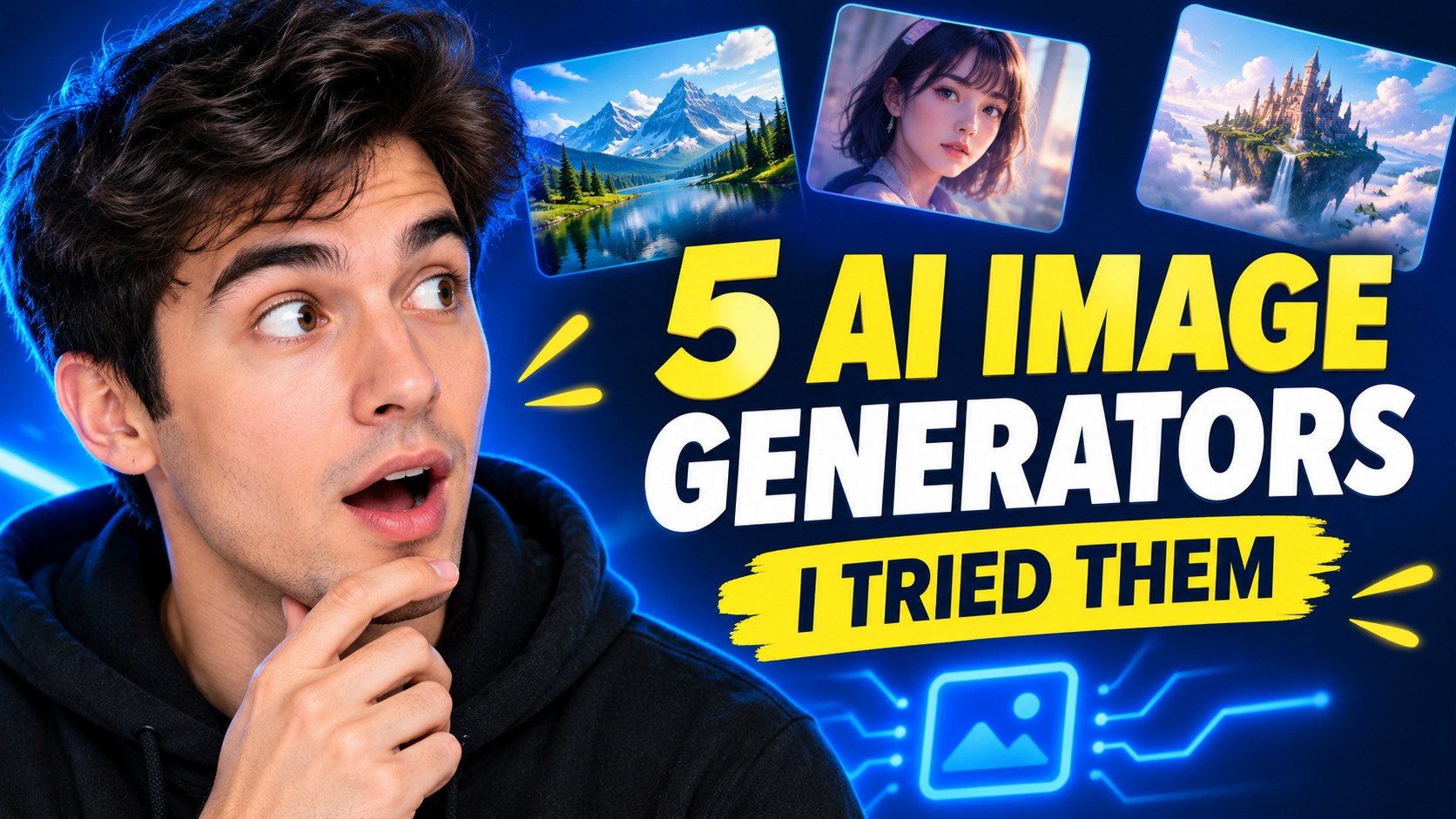
For the first concept, I wanted to explore a familiar YouTube visual language: a creator reacting to something surprising, with large headline text and a high-contrast background.
The idea is to make the video feel personal. Instead of presenting five tools as an abstract comparison, the thumbnail suggests that someone has actually tried them and has something interesting to show.
I would use a close-up creator portrait, a clear facial expression, and a limited palette of bright yellow, blue, and dark navy. The expression should support the story without making the image feel unnecessarily exaggerated.
The Prompt I Used
Create a polished YouTube thumbnail for a video titled "I Tried 5 AI Image Generators".

Canvas and composition:
Use a horizontal 16:9 composition designed for a YouTube thumbnail. Place a fictional young adult tech creator on the left side of the frame, shown in a close-up portrait with an intrigued, surprised expression while looking toward the right. Keep the face large, clearly visible, and easy to recognize at small display sizes.

Visual direction:
Use a bold, high-energy technology creator aesthetic with a deep navy background, vivid electric blue accents, and bright yellow highlights. Add a few clean visual references to AI image generation in the background, such as small image preview tiles showing a landscape, a portrait, and a fantasy scene. Keep these elements secondary and avoid clutter.

Headline typography:
Render the exact headline "5 AI IMAGE GENERATORS" in large, bold, highly legible uppercase lettering on the right half of the composition. Add the smaller supporting phrase "I TRIED THEM" beneath it. Use a strong yellow-and-white text hierarchy with enough contrast against the background.

Layout requirements:
Keep all headline text inside generous safe margins. Make the face, headline, and background visually distinct. Do not add any other words, logos, watermarks, numbers, or decorative text. Ensure the requested text is spelled exactly as provided.

The final image should feel like a professionally art-directed YouTube thumbnail for an AI tools tutorial, with one clear focal point and a composition that remains understandable when viewed at a small size.
Why I Chose This Direction
A human face gives the thumbnail a personal angle.
The subject is not just five AI tools; it's a person trying them. A close-up portrait helps communicate that the video is based on an individual experience.
The headline carries the main message.
I made "5 AI IMAGE GENERATORS" the primary text because it explains the video's topic directly. "I TRIED THEM" provides context without competing with the main headline.
The colors establish a clear hierarchy.
Yellow can help the headline stand out, while electric blue supports the technology theme. The dark background gives both elements room to breathe.
These are design intentions, not guaranteed model behaviors. The generated image is shown above; check whether the face, text, and background actually work together before using it.
What to Check in the Generated Image
Look at three things first:
- Does the facial expression feel natural and relevant to the topic?
- Is the headline spelled correctly and readable when the image is reduced?
- Do the background image tiles support the subject, or do they compete with it?
If the face takes up too much space, I would adjust its size or position. If the text is difficult to read, I would simplify the background and give the headline more visual separation.
The goal isn't simply to make the thumbnail loud. It's to create a clear visual hierarchy that guides the viewer from the face to the headline.
Concept 2: Clean and Comparison-Focused
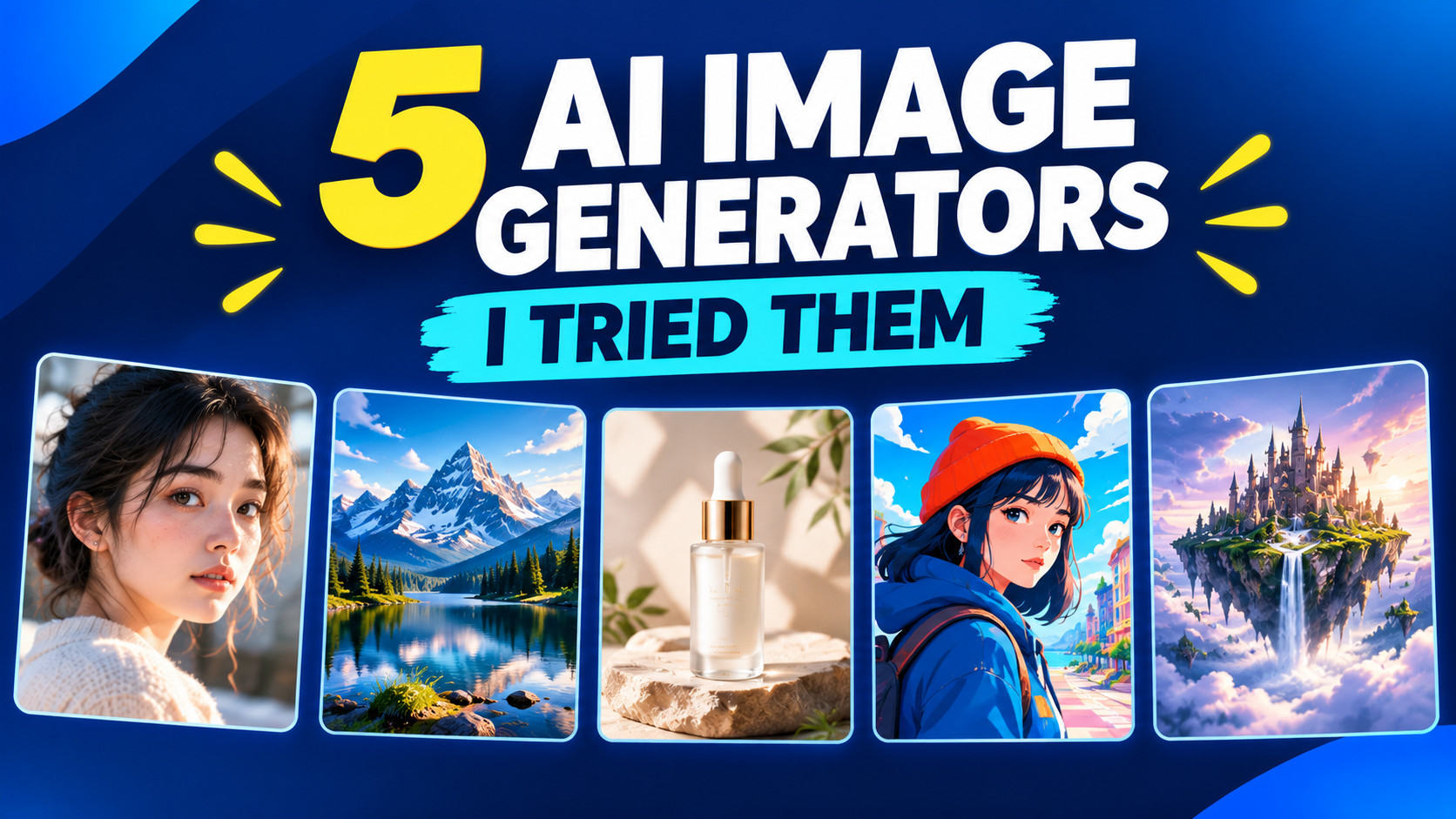
The second concept takes a different approach. Instead of relying on a creator's expression, I wanted the thumbnail itself to communicate the idea of comparing multiple AI tools.
This direction is more structured and information-driven. It could work well for a tutorial aimed at viewers who want to compare tools before choosing one.
I'd use a clean layout with a large central headline and five distinct image previews. Each preview would show a different type of generated image, such as a portrait, a landscape, a product advertisement, an illustration, and a fantasy scene.
I would avoid filling the thumbnail with detailed interface screenshots. At small sizes, those details are likely to become visual noise.
The Prompt I Used
Create a clean, modern YouTube thumbnail for an AI tutorial video titled "I Tried 5 AI Image Generators".

Canvas and composition:
Use a horizontal 16:9 layout. Build a balanced comparison-focused composition with a large central headline and five clearly separated image preview cards arranged around or beneath it. The overall design should feel organized, modern, and immediately understandable.

Image previews:
Show five visually distinct AI-generated image examples:
1. A photorealistic portrait.
2. A cinematic mountain landscape.
3. A premium skincare product advertisement.
4. A colorful digital illustration.
5. A surreal fantasy environment.

Each preview should have a distinct visual identity, but all five should belong to one cohesive thumbnail design. Use consistent card proportions, clean edges, and subtle depth. Do not use recognizable brand logos or imitate specific software interfaces.

Headline typography:
Render the exact main headline "5 AI IMAGE GENERATORS" in bold uppercase lettering. Place the supporting phrase "I TRIED THEM" nearby in a smaller but clearly readable style. Use dark navy, white, and vivid cyan as the primary palette, with a small amount of warm yellow for emphasis.

Layout requirements:
Make the headline the primary visual element and the five previews the secondary element. Preserve clear spacing between the text and the image cards. Keep all text inside safe margins and avoid overlapping the headline with important parts of the previews.

Do not add extra words, brand names, logos, watermarks, or random lettering. Spell both requested text elements exactly as provided.

The final result should resemble a polished editorial comparison thumbnail for a technology tutorial, with clean visual organization and strong readability at small sizes.
Why I Chose This Direction
The visuals explain what is being compared.
Five image previews communicate the idea of multiple generators without requiring five logos or a long list of tool names.
The layout favors clarity over drama.
The first concept depends on a person and an expressive reaction. This one relies on the relationship between the headline and the five preview cards.
The previews can make the topic feel more concrete.
Showing a variety of image types suggests that the video explores different kinds of AI-generated output. It also avoids the need to imply that all five tools produce the same kind of image.
What to Check in the Generated Image
The main risk is clutter. Five previews, a headline, and supporting text are a lot to fit into one thumbnail.
Check whether all five cards are visually distinguishable, whether the headline still dominates, and whether the design feels balanced rather than crowded.
Also inspect the preview images for coherence. If they merge together or look too similar, simplify the number of visible details or make the cards more distinct.
For this concept, I would prioritize legibility and organization over dramatic lighting or exaggerated expressions.
Concept 3: Futuristic and Technology-Driven
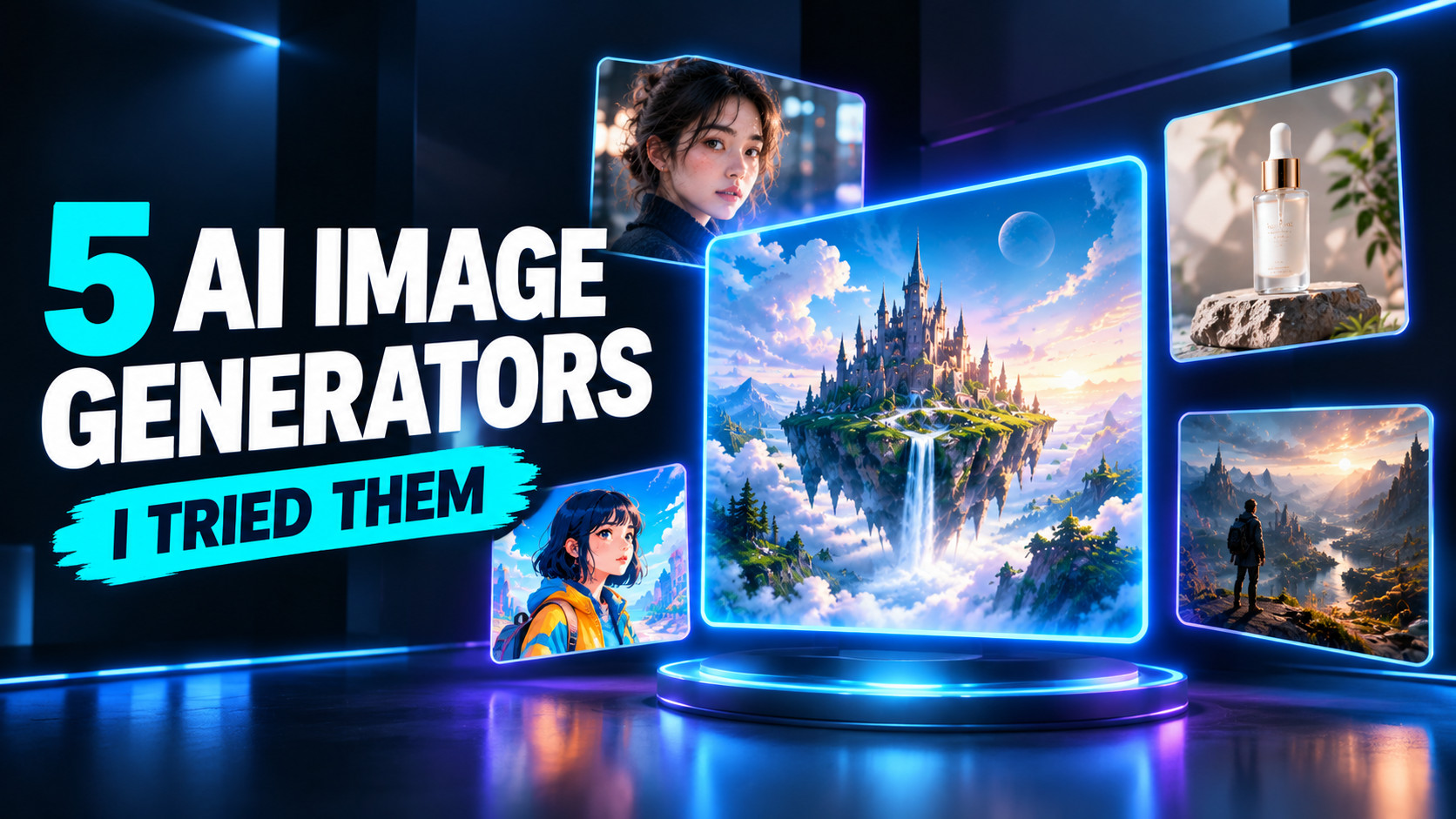
For the third concept, I wanted to lean into the technology theme. Rather than showing a creator or a conventional comparison grid, I'd create a more futuristic scene built around a central AI-generated image display.
The visual direction would use a dark background, luminous cyan and violet accents, floating image panels, and a strong headline. The image panels would suggest that multiple tools can transform a simple idea into different kinds of visual output.
I would keep the scene relatively restrained. Too many glowing effects, particles, and interface elements could make the thumbnail look generic or obscure the main message.
The Prompt I Used
Create a futuristic YouTube thumbnail for an AI tutorial video titled "I Tried 5 AI Image Generators".

Canvas and composition:
Use a horizontal 16:9 composition with a cinematic technology aesthetic. Place a large, luminous central display containing a visually striking AI-generated fantasy landscape. Surround it with four smaller floating image panels showing a portrait, a product image, an illustration, and a cinematic environment, suggesting a collection of different AI image generation results.

Visual direction:
Use a deep charcoal and midnight-blue background with controlled cyan and violet lighting. Add subtle reflections, clean geometric shapes, and restrained glow around the image panels. Keep the central display crisp and visually dominant. Avoid excessive particles, complicated interface graphics, or distracting decorative elements.

Headline typography:
Render the exact headline "5 AI IMAGE GENERATORS" in large, bold, uppercase lettering across the left side of the composition. Place the smaller supporting phrase "I TRIED THEM" directly beneath the headline. Use bright white lettering with selective cyan emphasis, maintaining strong contrast against the dark background.

Layout requirements:
Balance the headline on the left with the central image display on the right. Maintain generous spacing between major elements and keep the headline fully inside the safe area. The text must remain readable at small thumbnail sizes.

Do not add extra text, fake logos, watermarks, recognizable product branding, or random interface labels. Spell the two requested text elements exactly as provided.

The final image should feel like a premium technology YouTube thumbnail, combining futuristic atmosphere with a clear headline and a single dominant visual idea.
Why I Chose This Direction
The environment reinforces the technology theme.
Floating image panels and a central display suggest a world of generated visuals. This is a more conceptual way to communicate the subject than showing a person reacting.
The headline and visual scene have separate roles.
The headline explains the topic, while the image panels create atmosphere and suggest variety. I wouldn't want the visual effects to carry the entire message.
The composition is designed around two major zones.
The left side is reserved for the headline, while the right side contains the central display and supporting panels. That separation should make the design easier to understand than a composition in which text and imagery compete for the same space.
What to Check in the Generated Image
Check whether the central image display feels like the main subject, whether the smaller panels remain distinguishable, and whether the glow effects make the headline harder to read.
I'd also watch for a common problem with futuristic visual concepts: the image can look attractive while saying very little about the actual video.
If that happens, I'd reduce the decorative elements and make the five image-generation examples more prominent.
The key is to use futuristic styling to support the subject, not replace it.
Comparing the Three Thumbnail Concepts
Each direction communicates the same video topic, but each emphasizes a different reason someone might be interested in watching.
| Design element | Bold and Expressive | Clean Comparison | Futuristic |
|---|---|---|---|
| Main visual | Creator portrait | Five image previews | Central image display |
| Primary appeal | Human reaction and curiosity | Clear comparison | Technology and visual spectacle |
| Headline role | Complements the portrait | Organizes the layout | Anchors the composition |
| Main design risk | Expression overwhelms the message | Too many competing elements | Effects overpower the topic |
| Best-fit direction | Personality-led tutorial | Tool comparison and education | Visually driven AI content |
This table describes the intended differences between the concepts. It doesn't establish which thumbnail would receive more clicks.
To choose one for an actual video, compare the generated images at the same display size. Check headline readability, subject clarity, visual balance, and how quickly the topic becomes understandable.
I would not assume that the most colorful or dramatic version is automatically the most effective. The right choice depends on the video's audience, content, and the visual identity of the channel.
What I Learned From Designing These Concepts
1. A Thumbnail Needs One Clear Visual Priority
A thumbnail can contain a face, several images, bold text, and background effects, but those elements shouldn't all compete for attention.
For this video, the main message is that I tried five AI image generators. Everything else should support that idea.
2. Text Should Be Planned as Part of the Composition
Because I wanted GPT Image 2 to generate the headline directly, I included the exact wording, approximate placement, hierarchy, and contrast requirements in each prompt.
I would still verify the actual output carefully. A prompt can request exact spelling and readable typography, but those instructions don't guarantee that every letter will be rendered perfectly.
For a final published thumbnail, I'd correct any spelling mistakes or awkward letterforms before using the image.
3. More Visual Elements Don't Necessarily Mean More Information
The comparison concept contains five image previews, while the futuristic concept uses floating panels and lighting effects. Both could become cluttered if too many details compete with the headline.
I would simplify the image whenever an element fails to help communicate the video's topic.
4. The Same Video Can Support Different Creative Directions
The three concepts show different ways to interpret the same brief:
- A portrait emphasizes personal experience.
- A comparison layout emphasizes the tools and their outputs.
- A futuristic composition emphasizes the technology itself.
I would choose between them based on the video's actual content and the style of the channel rather than trying to combine every idea into one thumbnail.
Final Thoughts
For this case study, I explored three ways to approach the same AI tutorial thumbnail using GPT Image 2: bold and expressive, clean and comparison-focused, and futuristic.
Each direction starts with the same message but uses a different visual strategy to communicate it.
With all three versions generated, the next step is to compare them at the same display size and refine the prompts where the output doesn't match the design brief. Pay particular attention to the exact headline text, the balance between the words and imagery, and how the thumbnails look when reduced to a small size.
The most useful prompt isn't necessarily the longest one. It's the one that gives the image model a clear subject, a clear visual hierarchy, and a specific idea to communicate.
For YouTube thumbnails, I would start there before adding more effects, colors, or decorative details.
Frequently Asked Questions
Can GPT Image 2 render the headline text reliably?
Not consistently enough to skip checking. These prompts spell out the headline and ask for exact lettering, but an image model can still drop, merge, or misspell characters. This study did not measure how often that happens across repeated runs. Keep the headline short, then inspect the letterforms at the size the thumbnail will actually appear before you publish.
Could I add the text afterward instead of generating it in the image?
Yes, and it gives you exact spelling and full control over the typeface. The prompts here asked the model to render the text because in-image typography was part of the brief. If you plan to set the type in a design editor, remove the headline and supporting-text blocks and keep the composition instructions — but leave an empty area where the text will go, or the subject will fill the frame.
Will these prompts work for a different video?
Mostly, but the comparison framing is doing real work. The topic is named in only a few places — the video title, the headline, the supporting phrase, and the subjects of the preview images — so those are the parts to replace. A video about a single tool rather than five would need the previews and headline rebuilt, not just renamed.
How do I know which thumbnail will get more clicks?
You don't from this study: there is no click-through data here, only three design directions. The practical way to find out is to publish one, then swap in another for a comparable period and compare the click-through rate in YouTube Studio. That comparison was not run here.