Prompt techniques · Style words
How to Use Style Words in AI Image Prompts
Style words like cinematic or beautiful describe the impression you want, not the visual features that create it. Start with a recognizable style, then name the linework, shading, palette, and texture that define it.
Published: October 19, 2026
By ImagePromptBox Team
20 min read
You can add cinematic, beautiful, highly detailed, professional, artistic to almost any AI image prompt and still get an image that looks nothing like the style you had in mind.
The problem is that these words often describe the impression you want rather than the visual characteristics that create it.
When writing an AI image prompt, I treat a style word as a starting point, not a complete instruction. “Anime” tells the model roughly what kind of image to make, but it does not tell it whether I want thick outlines and flat cel shading or delicate linework and soft gradients. “Photorealistic” suggests a photographic look, but it does not specify the lighting, skin texture, lens characteristics, or color treatment that make a portrait convincing.
The practical approach is to start with a recognizable style, identify the visual features that define it, and then add only the details that support that direction.
Quick Answer
To use style words effectively in AI image prompts, combine a broad style label with specific visual characteristics such as linework, shading, color palette, texture, and lighting. Avoid stacking synonyms like “beautiful, stunning, masterpiece, ultra-detailed” and expecting them to create a consistent style.
For example, instead of writing anime style, try hand-drawn 1990s anime, bold ink outlines, flat cel shading, limited color palette, painted background, subtle film grain.
The second prompt gives the model a much clearer visual direction. In this guide, I'll break down how to choose style words, compare before-and-after prompts, and decide which details are worth adding when a result does not match your intention.
What Style Words Actually Control
A style word can influence several visual properties at once. Some words describe a medium, such as watercolor or oil painting. Others describe an aesthetic, such as editorial photography or retro futurism. Still others describe a particular visual treatment, such as cel-shaded, grainy, or minimalist.
These categories overlap, but distinguishing them helps you build more deliberate prompts.
Consider these three descriptions:
Watercolor illustrationidentifies a medium and a broad visual family.Watercolor illustration with loose pigment washes and visible paper texturedescribes how that medium should appear.Watercolor illustration with loose pigment washes, visible paper texture, a muted autumn palette, and soft edges around the treesdescribes both the treatment and the intended visual result.
Each addition narrows the possibilities, but more words are not automatically better. A detail is useful only when it directs the image toward something you actually want.
I find it helpful to think about style in four parts:
| Style component | What it tells the model | Example words |
|---|---|---|
| Medium | What kind of image or artwork to create | Oil painting, watercolor, vector illustration, editorial photography |
| Rendering | How shapes and surfaces should look | Cel-shaded, painterly brushwork, soft gradients, crisp edges |
| Color treatment | How colors should behave | Muted palette, limited colors, warm earth tones, high contrast |
| Texture and finish | What the surface should feel like | Film grain, visible paper fibers, matte finish, glossy reflections |
You rarely need every category. A clean vector illustration might need a medium, a color palette, and crisp edges. A cinematic portrait might benefit more from photographic treatment, directional lighting, and restrained color grading.
The key is to choose style words that describe visible features, not simply words that sound artistic.
Before & After Examples
The easiest way to understand style words is to compare prompts where one has a broad label and the other explains what that label means visually.
The following examples pair a broad style label with a more specific description of the same subject, and show both generated results. They are prompt comparisons, not a controlled benchmark — the seed and settings behind each generation are not recorded here.
Example 1: From Generic Anime to Traditional Cel Animation
Before Prompt
A young woman with short black hair wearing a school uniform,
standing on a quiet street, anime style.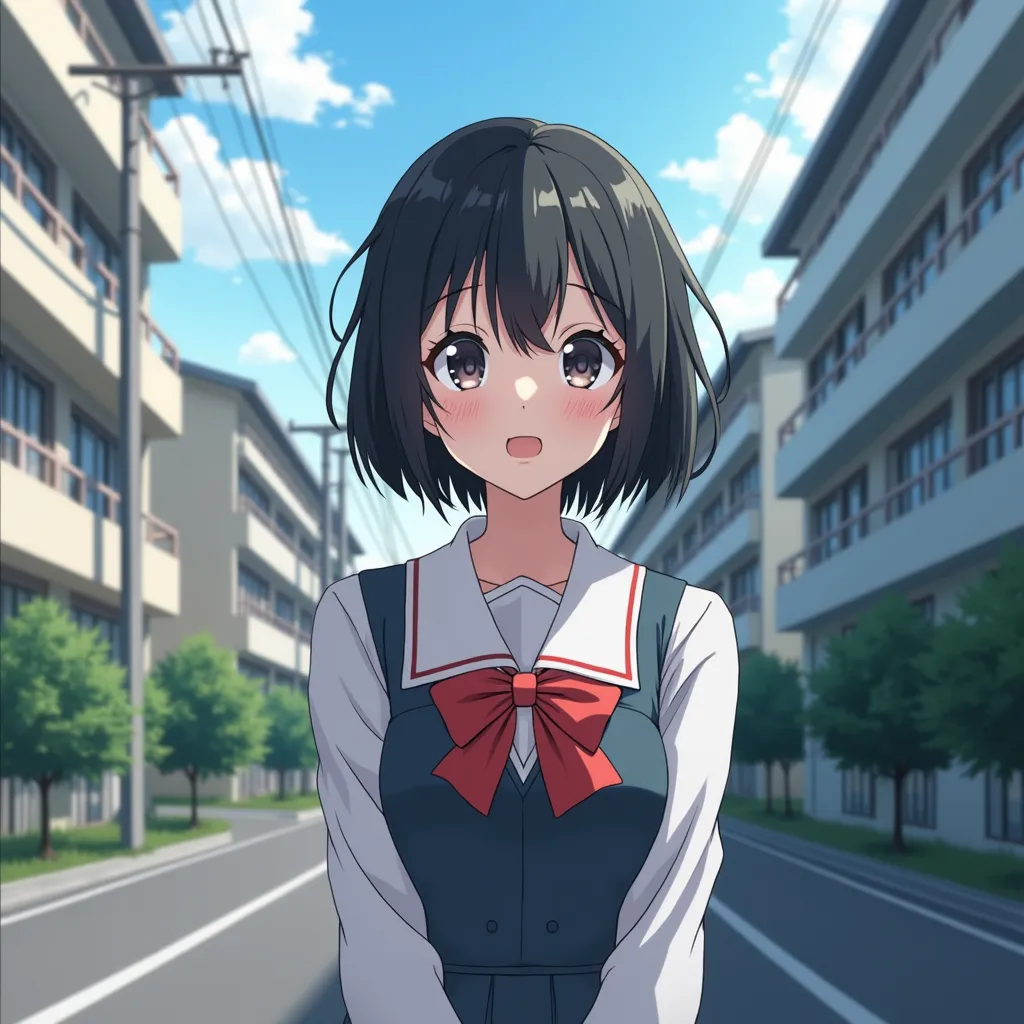
The prompt identifies the subject and setting, but anime style covers a huge range of visual approaches. The result could resemble modern glossy character art, soft pastel illustration, detailed digital painting, or traditional cel animation.
If the goal is a hand-drawn look inspired by older television animation, the style description needs to be more specific.
Improved Prompt
A young woman with short black hair wearing a school uniform,
standing on a quiet city street, hand-drawn 1990s anime aesthetic,
bold dark ink outlines, flat cel-shaded shadows with one clear
shadow layer, limited color palette, slightly imperfect linework,
painted background, subtle film grain, natural daylight.
Why It Works
The most useful changes are not the addition of more adjectives. They are the visual instructions that define the intended style.
Hand-drawn 1990s anime aestheticnarrows the broad reference toward a particular animation tradition.Bold dark ink outlinesgives the character edges more visual weight.Flat cel-shaded shadows with one clear shadow layerdescribes the treatment of light and shadow rather than merely asking for anime.Limited color palettediscourages an overly broad range of saturated colors.Painted backgroundallows the environment to have a different visual treatment from the character.Subtle film grainadds a restrained surface texture.
Notice what I did not add: masterpiece, award-winning, or extremely beautiful. Those phrases do not resolve the central ambiguity about linework and shading.
What I Noticed
One of the easiest mistakes with anime prompts is treating anime as if it were a single style. It is better understood as a broad category.
When a result looks too glossy or digitally polished, adding more quality-related adjectives is unlikely to address the real problem. The more direct adjustment is to describe the rendering: flatter shadows, stronger outlines, less gradient shading, or a painted rather than photorealistic background.
There is a trade-off, however. A prompt that strongly specifies traditional cel animation may be less suitable if you want the soft lighting and detailed gradients common in modern anime illustrations. The right style words depend on the particular look you are trying to preserve.
Example 2: From Ordinary Product Photography to a Minimalist Advertisement
Before Prompt
A glass skincare serum bottle on a table, professional product
photography, premium, beautiful, elegant, high quality.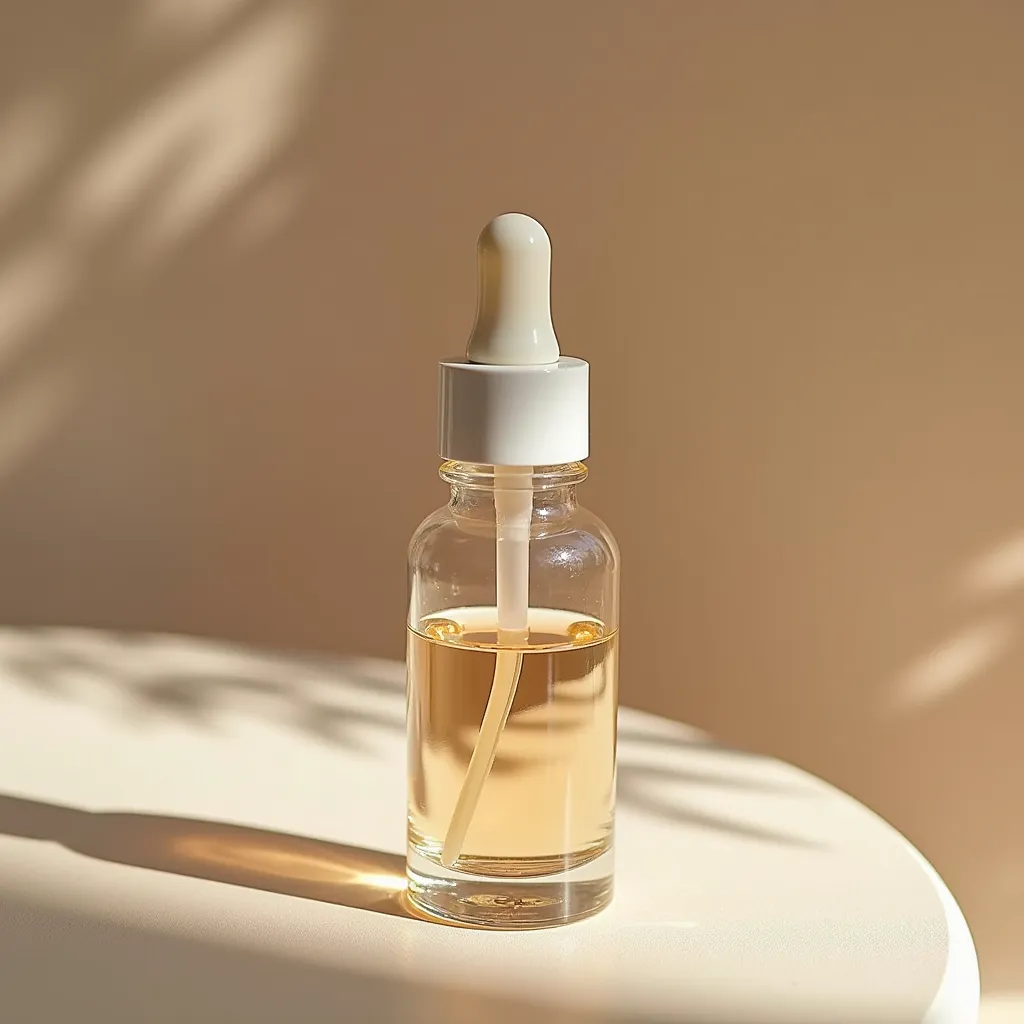
The problem is not that the prompt lacks style words. It already contains several: professional, premium, beautiful, and elegant.
The problem is that they overlap without specifying what a premium product image should actually look like.
A luxury skincare advertisement could use dramatic black backgrounds and sharp highlights. It could also use soft daylight, warm stone, and natural textures. Those are different creative directions.
Improved Prompt
A single clear glass skincare serum bottle with a matte ivory label,
centered slightly to the right on a warm off-white surface,
minimalist luxury product photography, soft diffused side lighting,
controlled highlights along the glass edges, subtle natural shadow,
muted beige and cream palette, clean background, generous negative
space on the left for advertising copy, refined editorial finish.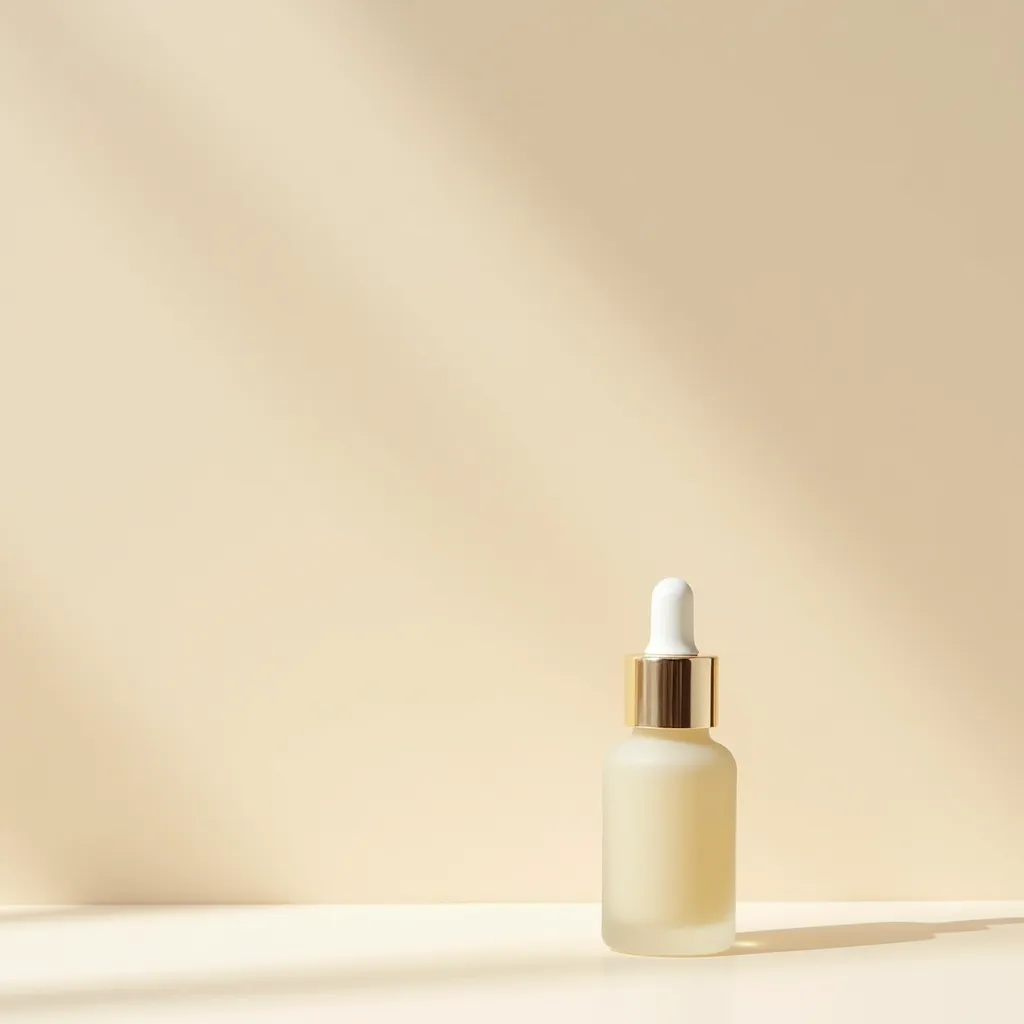
What Changed
The revised prompt gives the broad idea of luxury a visible form.
Soft diffused side lighting specifies the lighting treatment. Controlled highlights along the glass edges identifies where reflections should be useful. Muted beige and cream palette constrains the color direction. Generous negative space on the left defines a compositional requirement that the original prompt never mentioned.
Even the phrase premium product photography becomes more useful when it appears alongside details that explain how that premium look should be achieved.
Why It Works
Style is not separate from composition and lighting. In product imagery, they often work together.
A minimalist style can be undermined by extra props, busy backgrounds, or unnecessarily dramatic reflections. A restrained palette can be undermined by bright, unrelated colors. A clean advertising layout can be undermined if the product occupies the entire frame.
The improved prompt therefore does more than name a style. It describes how that style should affect the image.
One limitation: negative space on the left for advertising copy describes the intended layout, not a guarantee that the area will be perfectly empty. The result still needs visual inspection, especially when the image will be used in a real advertisement.
Example 3: From a Generic Portrait to Editorial Photography
Before Prompt
A young man with wavy hair wearing a black shirt,
photorealistic portrait, cinematic, detailed, professional.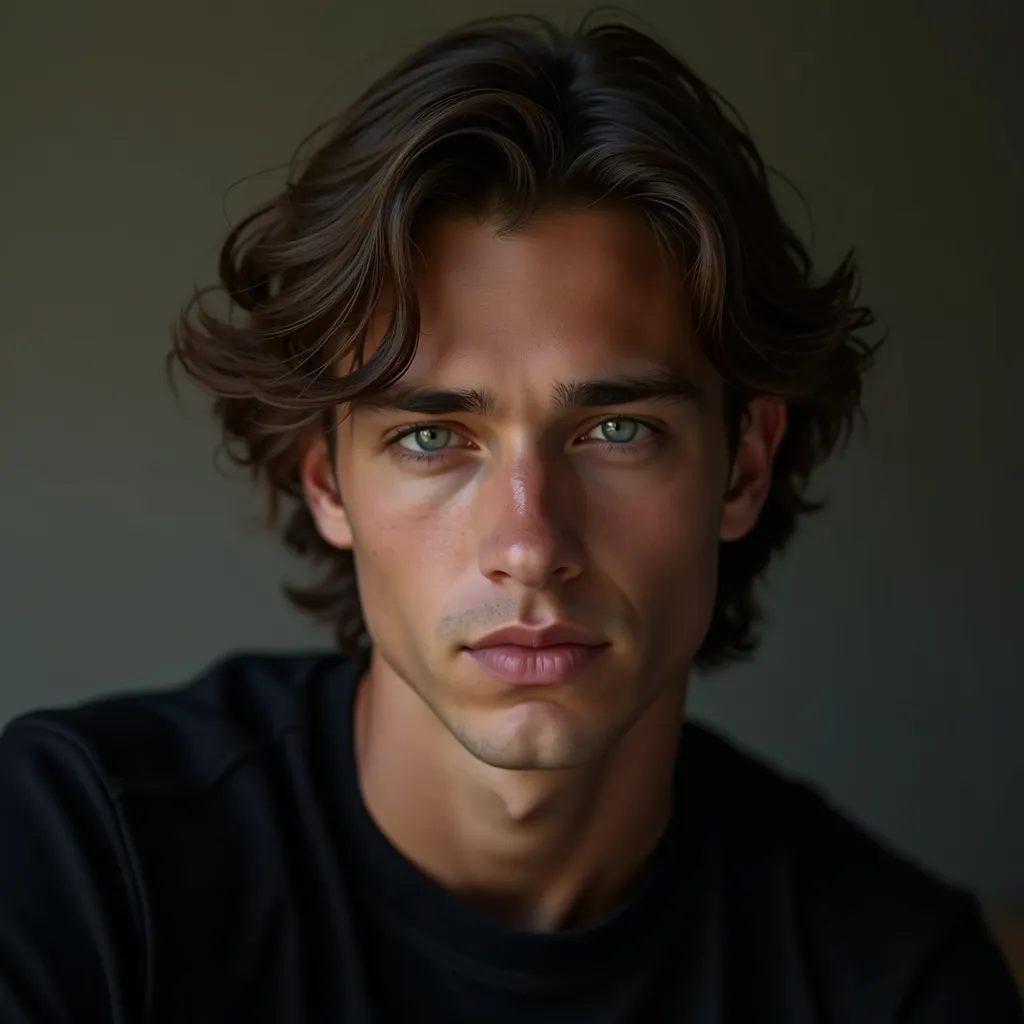
The words photorealistic and cinematic are popular for a reason: they communicate a broad visual intention. But neither one tells the model exactly how the portrait should be lit or finished.
Improved Prompt
Editorial portrait of a young man with thick wavy hair,
wearing a slightly unbuttoned black shirt against a plain studio wall,
relaxed seated pose, head tilted slightly downward, gaze just past
the camera, soft directional window light from frame-left,
natural skin texture, gentle shadow falloff, restrained contrast,
subtle monochrome film grain, understated black-and-white grading,
mid-thigh framing.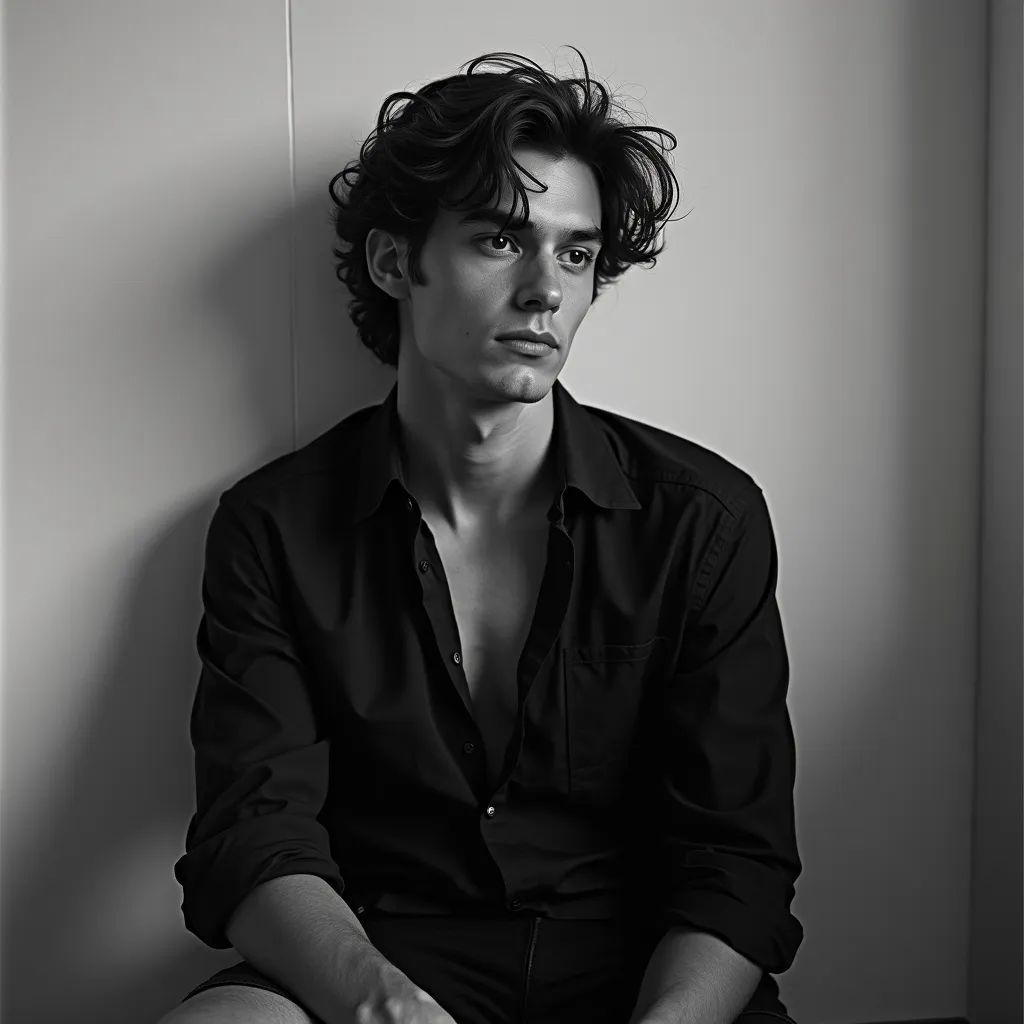
Why It Works
The style direction is now more precise:
Editorial portraitestablishes a photographic context.Soft directional window light from frame-leftdescribes both the character and direction of the light.Natural skin textureencourages a less airbrushed finish.Gentle shadow falloffdescribes the transition between lit and shadowed areas.Restrained contrastavoids pushing the image toward an excessively dramatic treatment.Subtle monochrome film graindefines the texture and tonal finish.Mid-thigh framinggives the composition a concrete boundary.
The prompt does not need to list every possible photographic characteristic. It needs to specify the ones that distinguish this portrait from other plausible portraits of the same subject.
What I Noticed
Words such as cinematic can be misleading when they become substitutes for actual lighting instructions. Different people use the term to describe moody shadows, wide compositions, dramatic color grading, shallow depth of field, or simply a polished movie-still appearance.
If the result is too bright, describe the desired light and shadow. If it looks excessively airbrushed, address skin texture. If the framing is wrong, address composition.
Changing the adjective that describes the whole image is often less informative than changing the particular visual property that looks wrong.
How to Choose the Right Style Words
When choosing style words for a new image, start with the desired visual outcome rather than a long list of aesthetic labels.
Here are several common goals and the kinds of descriptions that can help make them more concrete.
| Desired result | Useful style words | Details that help define the look |
|---|---|---|
| Realistic portrait | Editorial photography, naturalistic | Skin texture, directional light, restrained retouching |
| Traditional anime | Hand-drawn cel animation | Bold outlines, flat shadows, limited palette |
| Watercolor illustration | Watercolor, painterly | Pigment washes, soft edges, visible paper texture |
| Minimalist branding | Minimalist vector illustration | Simple geometry, crisp edges, restricted palette |
| Vintage photograph | Analog film photography | Film grain, faded colors, gentle contrast |
| Fantasy concept art | Painterly fantasy illustration | Atmospheric depth, textured brushwork, dramatic light |
| Premium product image | Luxury product photography | Controlled reflections, clean background, deliberate negative space |
These are starting points rather than fixed formulas. The same style label may produce different results across models, model versions, and generation settings.
Start With One Main Style
A prompt such as this gives the image several competing directions:
A futuristic city, photorealistic, watercolor, anime, 3D render,
vintage film, minimalist, highly detailed, cinematic.
Each phrase suggests a different visual language. Some combinations can work deliberately, but adding them without a clear plan makes it harder to predict the result.
Instead, decide on one main direction first:
A futuristic city at dusk, painterly science-fiction concept art,
layered atmospheric haze, broad textured brushwork, cool blue
shadows with restrained orange highlights, monumental architecture.
The revised prompt has a recognizable visual target. Its supporting details work toward the same result.
You can still combine styles, but give the combination a clear purpose. For example, photorealistic product with a hand-drawn annotation overlay is more deliberate than simply listing photography and illustration as separate styles.
Separate Style From Mood
Style and mood are related, but they are not interchangeable.
- Style: watercolor, editorial photography, cel animation, vector illustration.
- Mood: melancholy, playful, ominous, peaceful.
- Lighting: soft overcast light, hard side light, neon backlight.
- Color treatment: muted earth tones, limited pastels, high-contrast monochrome.
A prompt can be both a watercolor illustration and ominous. A photorealistic portrait can be playful. A minimalist advertisement can use dramatic lighting.
Separating these ideas gives you more control over the result. If the image has the right medium but the wrong emotional tone, changing the style label may move it in the wrong direction. Adjust the mood, lighting, or palette instead.
What I Noticed About Style Words
A few practical patterns are worth keeping in mind when refining prompts.
1. A Specific Visual Feature Can Be More Useful Than Another Style Label
Suppose the image looks too smooth. Adding editorial, cinematic, or high-end may not address the problem. A more direct instruction might be visible fine skin texture, subtle film grain, or slightly imperfect ink lines, depending on the desired medium.
The useful question is not, “Which impressive adjective should I add?” It is, “What visible feature is missing from the result?”
2. The Same Word Can Help One Image and Hurt Another
Film grain can reinforce an analog photographic look. It may make a clean product advertisement look unnecessarily dirty. High contrast can help a dramatic portrait but destroy the soft tonal transitions of a gentle watercolor scene.
No style word is inherently good. Its usefulness depends on the visual target.
3. Quality Words Do Not Fix an Unclear Direction
Phrases such as masterpiece, 8K, ultra-detailed, and best quality are frequently added to weak prompts. They may influence how a model interprets the requested finish, but they do not explain whether the image needs flatter shading, a softer palette, a different light source, or a simpler composition.
When an image misses the target, I would inspect its visual decisions before adding more quality adjectives.
4. Style and Subject Need to Work Together
A watercolor treatment might look convincing on a landscape but require different handling around a person's face. A vector illustration can suit a clean infographic but look overly rigid when the goal is expressive character art.
The style should serve the subject and the intended use. Choosing a style merely because it sounds appealing can produce a visually attractive image that still fails the task.
Common Mistakes When Using Style Words
Mistake 1: Using Too Many Synonyms
Weak Prompt
A beautiful, stunning, gorgeous, amazing, incredible,
masterpiece-quality fantasy castle.
Why It Fails
Most of these words express a similar positive evaluation. They do not define the castle's shape, architectural influence, lighting, or rendering style.
Do This Instead
A towering fantasy castle built from pale weathered stone,
Gothic arches and narrow spires, mist drifting through the
lower courtyard, painterly fantasy concept art, cool blue-gray
shadows, warm light glowing from the windows.
Now the prompt describes a subject, an architectural language, an environment, and a visual treatment.
Mistake 2: Naming a Medium Without Describing Its Appearance
Weak Prompt
A red fox in a forest, watercolor.Why It Fails
The medium is clear, but the prompt leaves the watercolor treatment open to interpretation. The result could be loose and transparent or resemble a digitally painted image with watercolor-like colors.
Do This Instead
A red fox standing among ferns in a forest, delicate watercolor
illustration, transparent pigment washes, soft bleeding edges,
visible cold-pressed paper texture, muted green foliage and
rust-red fur, loosely painted background.
Why This Helps
Pigment washes, paper texture, and soft edges describe properties associated with the intended medium. The palette and background treatment reinforce the same direction.
Mistake 3: Mixing Incompatible Styles Accidentally
Weak Prompt
A realistic portrait in flat vector art with thick cel shading,
soft watercolor edges, glossy 3D rendering, and vintage film grain.
Why It Fails
This prompt does not give the model a clear priority. It asks for realistic surfaces, flat vector shapes, watercolor edges, glossy three-dimensional rendering, and analog film texture simultaneously.
These combinations are not impossible, but each should have a reason.
Do This Instead
For a deliberate mixed-media result:
A realistic editorial portrait with a subtle hand-drawn ink
overlay, natural photographic skin texture, clean black contour
lines around the silhouette, muted colors, restrained mixed-media
finish.
The photographic portrait is the main style, and the ink overlay is a specific secondary treatment.
Mistake 4: Treating Negative Words as a Universal Solution
Weak Prompt
A clean watercolor landscape, no digital look, no harsh edges,
no plastic texture, no artificial colors.
Why It Fails
Listing unwanted features does not necessarily communicate what their replacements should look like. Also, negative-prompt behavior differs between models and interfaces.
Do This Instead
A soft watercolor landscape with transparent pigment washes,
naturally varied green tones, loose organic brushwork, gentle
transitions between colors, visible paper texture, and softly
defined tree silhouettes.
This describes the positive visual qualities that are wanted.
For example, current Black Forest Labs guidance for FLUX recommends positive descriptions instead of relying on negative prompts, while some Stable Diffusion workflows expose a separate negative-prompt field. Check the model and interface you actually use rather than assuming the same syntax applies everywhere.
How This Changes Across Models
Style words are not interpreted identically by every image generator. The practical workflow remains similar, but the way you express and refine the prompt may change.
GPT Image
Start with a clear description of the subject, desired style, composition, and visual treatment. Use natural language to describe what the output should look like rather than relying entirely on isolated adjective lists.
For example, a hand-painted watercolor illustration with transparent washes and visible paper texture describes a more concrete target than beautiful watercolor art.
When the image misses the intended style, identify the specific visual mismatch and revise that part of the prompt.
Midjourney
Midjourney offers both textual style descriptions and controls that affect stylization. Its official documentation explains that the --stylize or --s parameter changes the balance between following the prompt more literally and applying the model's own artistic interpretation. A higher setting can introduce more artistic freedom, which may also take the result further from the precise details you requested.
This distinction matters: changing style words and changing stylization settings are not the same experiment.
If you are trying to understand why an image looks different from your target, avoid changing both at once. Keep the settings fixed while refining the textual description, then evaluate whether a setting adjustment is necessary.
FLUX
For FLUX, begin with a direct description of the subject and the visual outcome you want. Its published prompting guidance emphasizes clear positive descriptions, including the intended lighting, context, and style. It also advises against relying on negative prompts for models covered by that guidance.
Instead of writing no harsh shadows, describe soft, evenly diffused light with gentle shadow transitions.
This is not a guarantee that every detail will be followed exactly. Treat it as a clear starting point and inspect the output.
Stable Diffusion
Stable Diffusion workflows can differ depending on the model checkpoint, interface, and available controls. Some support explicit negative prompts and weighted terms, but the exact options are implementation-dependent. Stability AI's developer documentation, for example, describes prompt weighting and negative prompting in its multi-prompting workflow.
For style exploration, keep the checkpoint and generation settings consistent while comparing different descriptions. Otherwise, you may attribute a visual change to the wording when another variable actually changed.
The Practical Rule
Do not assume a style phrase will produce identical results across GPT Image, Midjourney, FLUX, and Stable Diffusion.
The most reliable comparison is to hold the subject, composition, and relevant settings constant, then change the style description. That makes the effect of the wording easier to evaluate.
Prompt Template: Build a Style Description That Means Something
Here is a reusable structure for prompts where visual style matters:
[Subject and action], [composition], [main style or medium],
[distinctive rendering characteristics], [color treatment],
[lighting], [texture or finish], [important constraints].
You do not need to fill every slot. Include only the details that matter for your intended image.
For example, a fantasy illustration might use:
A floating island supporting an enormous ancient tree,
wide cinematic composition with the island positioned above a
sea of clouds, painterly fantasy concept art, expressive organic
brushwork, layered atmospheric depth, muted teal and moss-green
palette with warm golden light filtering through the branches,
weathered bark texture, distant mountains softened by mist.
This prompt establishes a subject, composition, style, rendering approach, palette, lighting, and environmental depth. Each detail has a purpose.
For a simpler image, use a shorter version:
A red fox in a quiet forest, watercolor illustration,
transparent pigment washes, soft edges, muted autumn palette,
visible paper texture, loosely painted background.
The aim is not to create one universal formula. It is to build a prompt in which the style words and the supporting visual details point in the same direction.
A Simple Way to Test Style Words
When you are unsure whether a word improves a prompt, make a small controlled comparison instead of rewriting everything.
Step 1: Fix the subject.
Choose one subject and keep it unchanged. For instance, use the same young woman, pose, clothing, and street setting in every version.
Step 2: Change the style description.
Compare anime style, hand-drawn cel animation, and soft painterly anime illustration. Leave the other parts of the prompt as consistent as you can.
Step 3: Look for visible differences.
Inspect the linework, shadow shapes, color palette, texture, and treatment of the background. Decide which version is closer to your intended result, rather than simply choosing the most attractive image.
Step 4: Refine one weakness.
If the selected result has good linework but overly smooth shading, revise the shading instructions. If the style is right but the palette is wrong, change the color description.
Step 5: Keep a record of useful wording.
Save the prompt and the generated image together. Over time, this gives you a practical reference for which descriptions work with a specific model and workflow.
If you use ImagePromptBox to study an existing image, look beyond the broad style label when analyzing it. Try identifying its medium, line quality, palette, lighting, and surface texture separately. Those observations provide more useful starting points for recreating a similar visual direction.
Where This Still Breaks
Detailed style descriptions improve the clarity of a prompt, but they do not give you complete control over the final image.
A model can interpret limited color palette differently from what you intended. It may produce soft shadows even when you specify flat cel shading, or add decorative details that weaken a minimalist composition. The same prompt can also produce meaningful variation between generations.
Some styles are easier to describe than others. A limited-palette vector illustration has relatively visible characteristics, while a more subtle editorial aesthetic may depend on the interaction between lighting, color grading, composition, and subject treatment.
There is also a difference between naming a style and matching a particular visual reference. If your goal is a close match to an existing image, textual description alone may not capture all the relationships that define its appearance. A reference image or image-editing workflow may be more useful, depending on the model and tool.
Finally, do not confuse a better prompt with a guaranteed result. If a style consistently comes out wrong, consider whether the model is suited to the task, whether its settings need adjustment, or whether a different generation workflow would be more effective.
What Actually Made the Difference
The biggest practical lesson is that style words work best when they describe a recognizable visual direction and are supported by concrete visual details.
Anime is a starting point. Hand-drawn cel animation, bold ink outlines, flat shadows, limited colors, and a painted background expresses a more specific intention.
Premium photography is a starting point. Soft directional light, controlled glass reflections, a muted palette, and generous negative space tells the model more about how the image should look.
When a result misses the target, resist the temptation to add another stack of impressive adjectives. Identify what is actually wrong: the shading, edges, texture, lighting, palette, or composition. Then change the smallest relevant part of the prompt.
For your next image, keep the subject fixed and compare two versions with different style descriptions. Look at the generated images closely, note what changes, and save the wording that gets you closer to the intended result.
That is a much more useful way to learn style words than collecting long lists of supposedly powerful prompt adjectives.