Case study · Product photography
How to Create E-commerce Product Photos With AI: 4 Mac mini M5 Examples
One product photo can serve several e-commerce needs: a clear main image, a lifestyle scene, a multi-angle showcase, and a promotional image.
Published: October 26, 2026
By ImagePromptBox Team
10 min read
A single product photo can be useful for more than one purpose. An online store needs a clean main image, a lifestyle photo that helps customers imagine the product on their desk, detailed views that show its design, and promotional graphics for seasonal campaigns.
Creating all of these assets traditionally can involve multiple photo shoots, different setups, and considerable editing time.
For this case study, I used one real photo of a Mac mini M5 as the reference image and created four different types of e-commerce visuals with AI. Each version serves a different purpose, from a simple white-background product image to a Black Friday promotional creative.
I wanted to explore how one source photo could support several parts of a product marketing workflow without having to start with a completely new image each time.
The Original Product Photo
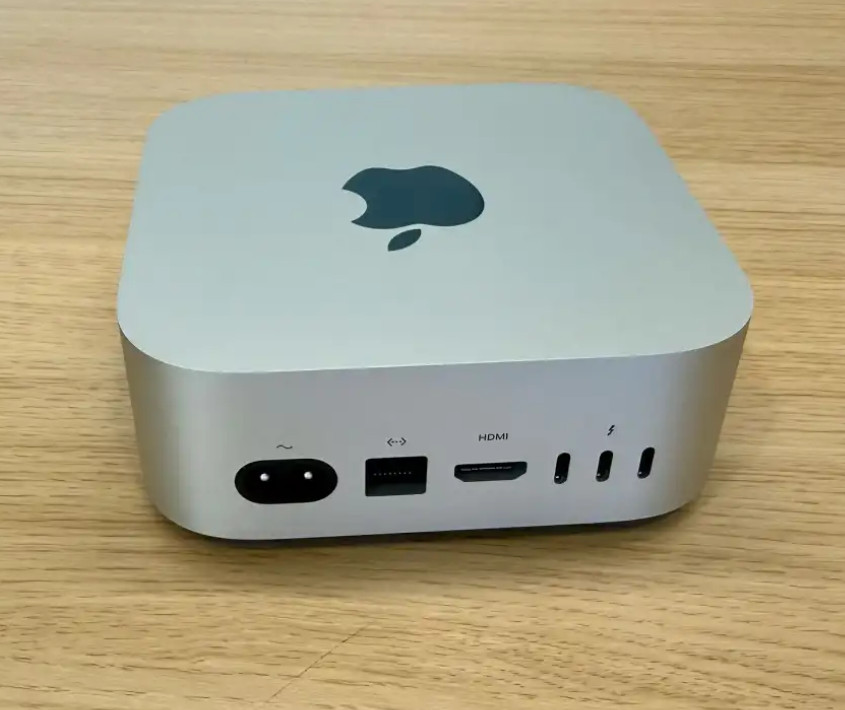
I started with a real product photo of the Mac mini M5. This image served as the reference for all four transformations.
Using the same source image gives the project a consistent starting point. Instead of generating an entirely new computer for every scene, the prompts guide the model toward different presentations of the same product.
The four directions cover common e-commerce needs:
- A clean white-background main image for a product listing.
- A lifestyle image showing the computer in a home office.
- A four-panel collage highlighting different product views.
- A Black Friday campaign image designed for promotional use.
These images have different goals, so I didn't use the same prompt structure for all four. A main image needs simplicity, a lifestyle image needs context, a product collage needs clear visual organization, and a promotional graphic needs a stronger campaign mood.
1. White-Background E-commerce Main Image
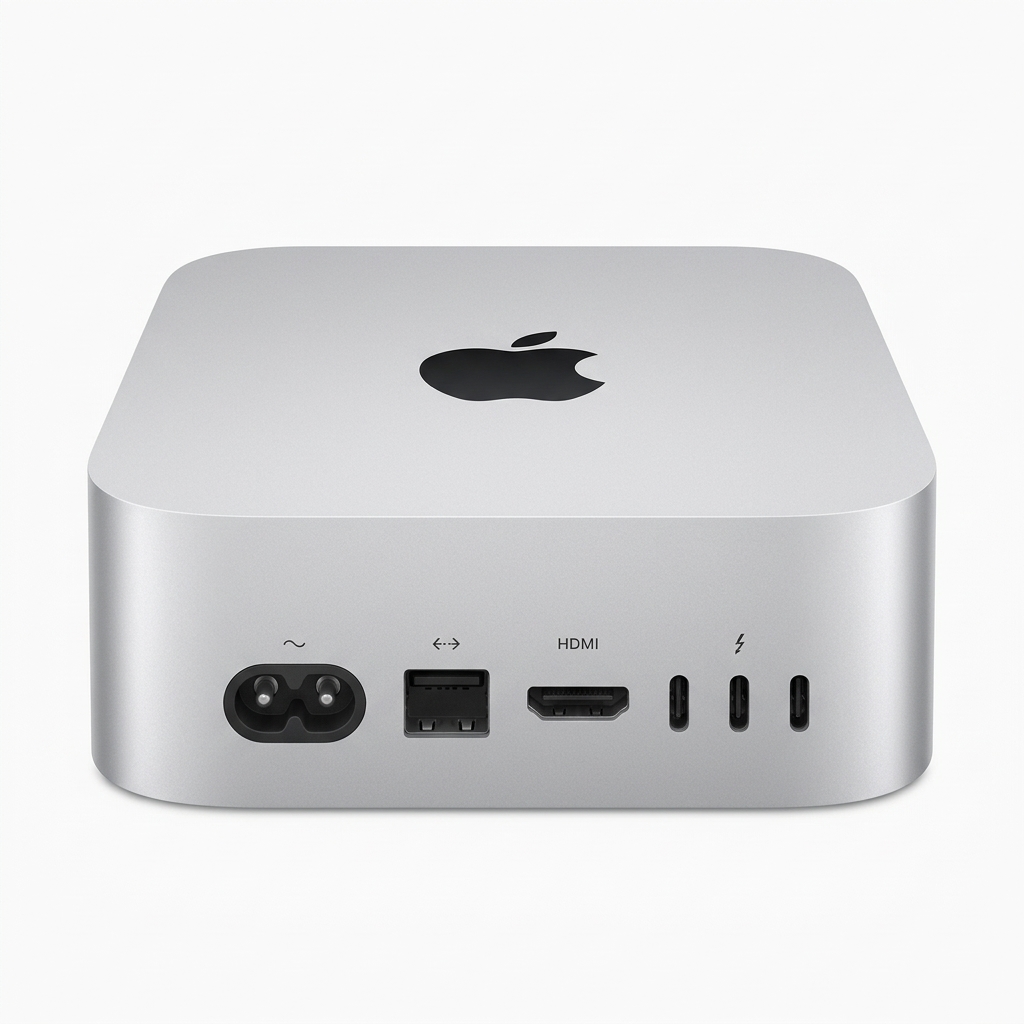
The first image is a straightforward product shot on a pure white background.
This is one of the most recognizable formats in e-commerce photography. The product takes center stage, with minimal distractions and enough detail for shoppers to understand its overall shape and finish.
For this version, I focused on the silver aluminum enclosure, compact square shape, rounded corners, centered composition, and soft studio lighting.
Prompt
A professional e-commerce product photography of a modern ultra-compact mini desktop PC, inspired by the Mac mini. Sleek silver aluminum unibody, minimalist square design with rounded corners, the iconic circular logo on top. Perfect top-front view angle, centered composition, crisp details, soft studio lighting, sharp focus, pure solid white background, high resolution, 8k --ar 1:1Why This Prompt Works
- Professional e-commerce product photography establishes a commercial product-shot style rather than a casual desk photo.
- Sleek silver aluminum unibody describes the material and finish that make the product visually distinctive.
- Minimalist square design with rounded corners emphasizes its compact industrial design.
- Centered composition gives the product a clear visual hierarchy.
- Soft studio lighting helps reveal the metallic surface without making the image look overly dramatic.
- Pure solid white background removes environmental distractions and makes the image easier to use in a product catalog.
The main idea is to keep the prompt focused. A white-background product image doesn't need decorative props, dramatic scenery, or a long description of the surrounding environment.
One important distinction: a white background does not automatically make an image compliant with every marketplace's image requirements. Image dimensions, margins, logos, shadows, and other restrictions vary by platform. AI-generated product images should be checked against the relevant listing rules before publication.
2. Lifestyle Product Photography
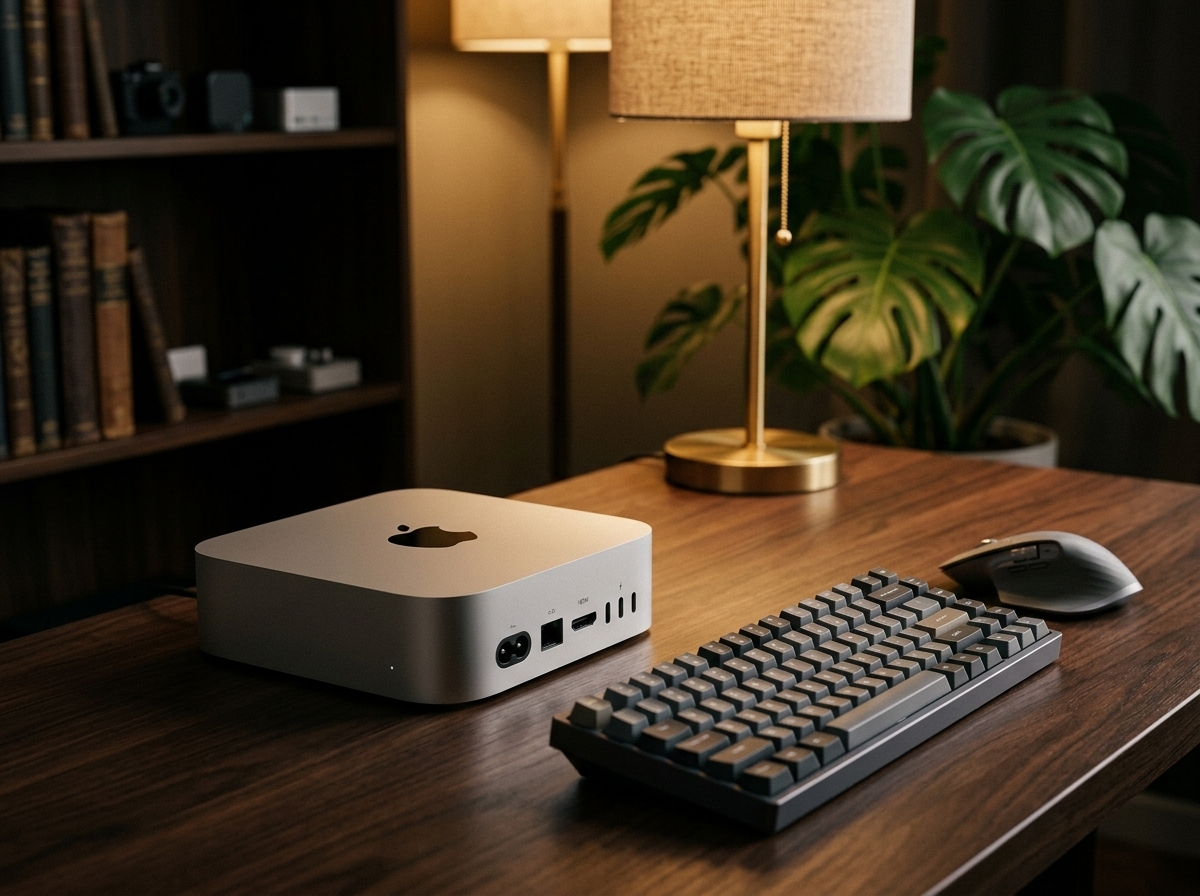
A clean product image communicates what the product looks like, but it doesn't show how it fits into everyday life.
For the second version, I placed the silver mini computer in a minimalist home-office environment. A walnut desk, keyboard, wireless mouse, ambient lighting, and a softly blurred plant help establish a workspace without making the scene too busy.
The goal is to make the product feel like part of a real setup rather than an isolated object on a white background.
Prompt
A cinematic lifestyle product photography of a silver mini desktop computer sitting neatly on a minimalist dark walnut wooden desk. Next to a high-end designer keyboard and a sleek wireless mouse. In the background, a warm aesthetic desk setup with a soft ambient desk lamp, a green potted plant out of focus, cozy and productive home office atmosphere, photorealistic, cinematic lighting, depth of field, 8k --ar 4:3Why This Prompt Works
- Cinematic lifestyle product photography signals that the image should communicate a setting and mood, not just show the product.
- Dark walnut wooden desk introduces a warm material contrast against the silver aluminum.
- Keyboard and wireless mouse provide familiar context for a desktop computer.
- Soft ambient desk lamp adds warmth and helps establish a comfortable workspace.
- Green potted plant out of focus introduces a natural element without competing with the product.
- Depth of field helps separate the main subject from the background.
The important part is the relationship between the product and its surroundings. The dark wood makes the silver enclosure stand out, while the keyboard and mouse explain how the computer might be used.
I also deliberately kept the background elements secondary. In lifestyle photography, it's easy for an attractive desk setup to become the main subject. The computer should remain the visual focus, with the props supporting the story.
This kind of image is useful for product detail pages, landing pages, social media posts, and editorial content where customers need to imagine the product in their own workspace.
3. 2×2 Multi-Angle Product Showcase
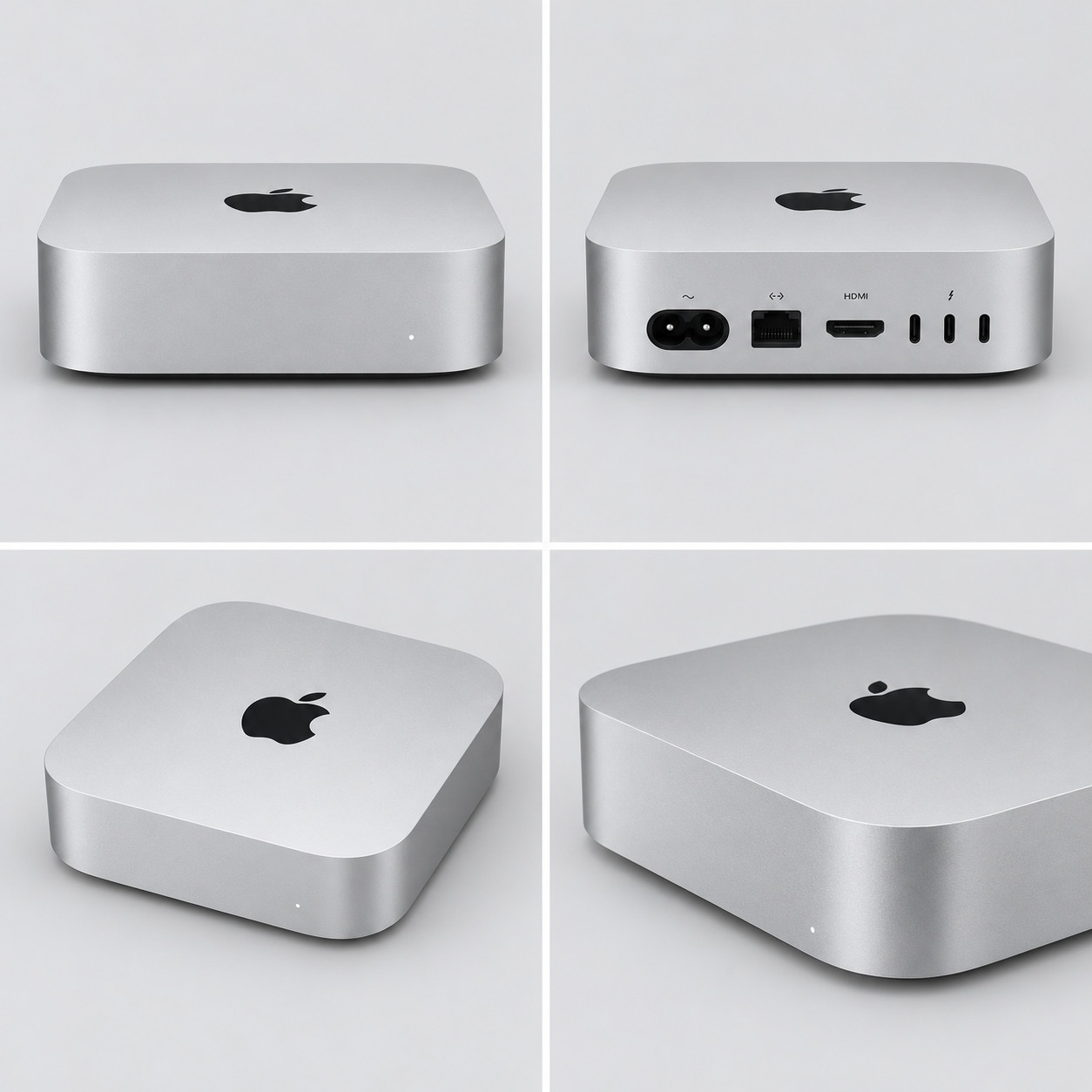
The third concept takes a more informational approach. Instead of placing the computer in a new environment, the prompt asks for a four-panel collage showing different views of the product.
The intended layout includes a front view, rear connectivity ports, an elevated top-down view, and a close-up three-quarter angle.
This format can help shoppers understand a product's design from several perspectives without having to scroll through four separate images.
Prompt
A premium 2×2 product photography collage of a sleek silver mini PC, featuring consistent studio lighting, a seamless light grey background, and precise industrial design details. The four panels showcase a straight-on front view, rear connectivity ports including Thunderbolt, HDMI, and Ethernet, an elevated top-down view, and a close-up three-quarter angle, all rendered with sharp focus, realistic metallic textures, balanced composition, and ultra-high detail, 8K quality --ar 1:1Why This Prompt Works
- Premium 2×2 product photography collage defines the layout before describing the individual views.
- Consistent studio lighting helps the four panels feel like parts of the same product presentation.
- Seamless light grey background keeps the collage clean while giving it a slightly softer appearance than pure white.
- Straight-on front view establishes the product's front-facing design.
- Rear connectivity ports directs attention to practical hardware details.
- Elevated top-down view shows the enclosure's overall shape and top surface.
- Close-up three-quarter angle adds depth and reveals the product's form.
- Realistic metallic textures reinforces the silver aluminum finish.
This prompt is different from the first two because layout is just as important as photographic style. If the model produces four attractive views but arranges them inconsistently, the result may be less useful as a product showcase.
There is also a practical limitation to keep in mind: generating a multi-view collage is not the same as producing verified technical product photography. AI may invent, omit, or rearrange ports and other details. Even when the overall design looks convincing, the small hardware features may not match the real device.
For a commercial listing, verify the ports and enclosure against official product references before using the image to communicate specifications. If exact technical accuracy is essential, separately photographed or rendered product views are a safer choice.
4. Black Friday Promotional Image
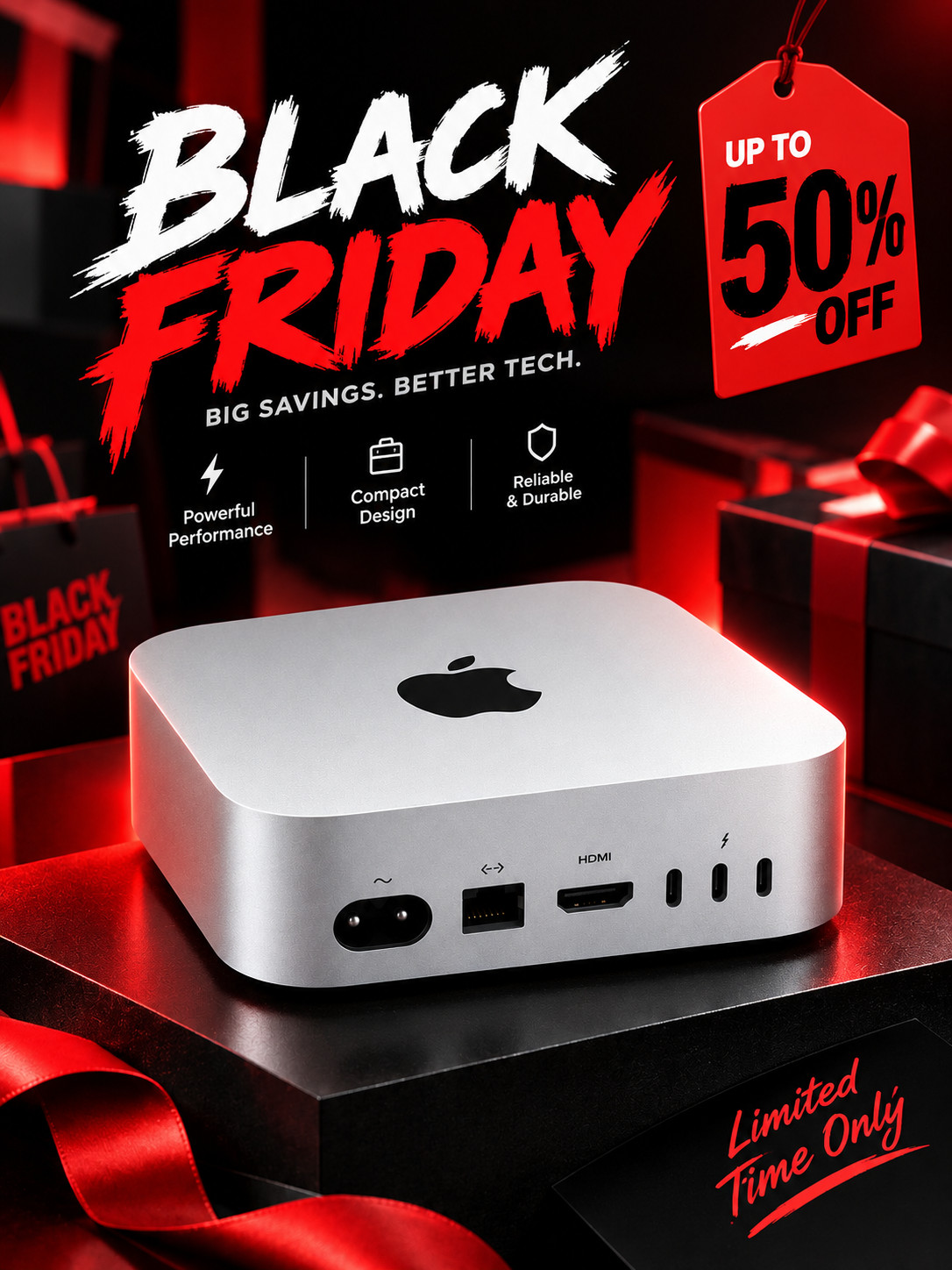
The final direction shifts from product presentation to marketing.
A Black Friday creative needs to stand out in a busy promotional environment. Rather than using the restrained lighting of a catalog image, this prompt calls for a bold campaign scene with stronger contrast and a more energetic commercial mood.
I also included explicit instructions to preserve the product's compact shape, silver finish, logo, and rear connections.
Prompt
Place the silver Mac mini desktop computer in a bold Black Friday themed campaign scene, strong commercial composition, high-contrast lighting, modern promotional feel, keep the product’s original compact square shape, rounded aluminum enclosure, silver finish, black Apple logo, rear power connector, Ethernet port, HDMI port, and Thunderbolt ports accurate and consistent with the reference image, 8K quality --ar 3:4Why This Prompt Works
- Bold Black Friday themed campaign scene establishes the promotional purpose immediately.
- Strong commercial composition encourages a more deliberate advertising layout.
- High-contrast lighting helps the product stand out visually.
- Modern promotional feel pushes the image away from a neutral catalog aesthetic.
- Keep the product's original compact square shape reinforces the key physical characteristics.
- Silver finish and black Apple logo identify important visual details that should remain consistent.
- Rear power connector and connectivity ports explicitly call out features that could otherwise be changed during image editing.
This is the most campaign-oriented prompt in the set. The product still needs to be recognizable, but the surrounding visual treatment can be much more expressive than in the white-background version.
There is one limitation worth highlighting: the prompt doesn't specify exact discount text, pricing, or a particular graphic layout. That leaves the model more freedom to interpret the promotional scene. If the result needs a precise headline such as “BLACK FRIDAY” or a specific discount, those elements should be described explicitly or added afterward in a design editor.
For real advertising, also double-check every product detail. Strong lighting and dramatic styling can make an image visually appealing, but they don't guarantee that the device's physical features remain accurate.
Comparing the Four E-commerce Image Styles
The same reference photo can support several different image roles, but each role needs a different visual priority.
| Image type | Main priority | Background and styling | Best suited for |
|---|---|---|---|
| White-background main image | Product clarity | Pure white, soft studio light | Product listings and catalogs |
| Lifestyle product photo | Context and atmosphere | Walnut desk, accessories, warm lighting | Product pages and landing pages |
| 2×2 multi-angle showcase | Design and feature visibility | Light grey studio background, four views | Product detail and feature sections |
| Black Friday promotional image | Campaign impact | High contrast, bold commercial styling | Seasonal ads and promotional creatives |
The key is to decide what the image needs to communicate before writing the prompt.
A product listing image should make the product easy to inspect. A lifestyle image should help the customer imagine using it. A multi-angle showcase should explain its design. A campaign image should attract attention while keeping the product identifiable.
Trying to make one image do all four jobs usually results in an unfocused composition.
What to Check Before Using These Images
Generating a visually appealing image is only one part of creating useful e-commerce assets. Before publishing the results, check a few things.
Product consistency. Compare the generated device with the real reference photo. Pay particular attention to the enclosure, corners, logo, ports, and overall proportions.
Background and composition. Make sure the product remains clearly visible and doesn't blend into the background. For white-background images, check the actual background color and whether the framing meets the intended marketplace's requirements.
Small technical details. AI-generated ports, connectors, and logos can look plausible without being accurate. Avoid relying on a generated image as the sole source of technical information.
Text and promotional claims. If a campaign requires an exact discount, product name, or legal disclaimer, verify it carefully. Adding typography in a design editor often gives more predictable results than relying on image generation alone.
Image dimensions. The four prompts use different aspect ratios because the intended formats differ. A square image works well for many catalog layouts, a landscape composition provides room for a lifestyle scene, and a vertical image offers a different format for promotional placements. The final dimensions should still match the destination platform.
Final Thoughts
This case study shows how one real product photo can serve as the starting point for four different e-commerce image concepts.
The biggest difference between the prompts isn't the number of descriptive words. It's the purpose behind each image.
- Start with a clean background when the product itself is the priority.
- Add a believable environment when context and atmosphere matter.
- Specify the panel layout when several product views need to appear together.
- Use stronger lighting and campaign direction when creating promotional imagery.
AI can help explore these directions without requiring a separate physical setup for every concept. However, product fidelity still matters, particularly for electronics, where small differences in ports, logos, or enclosure design can mislead customers.
My preferred workflow is to use AI to explore compositions and visual directions, then verify product details and make any necessary corrections before publishing the final assets.
One source photo can provide a surprisingly flexible starting point, as long as each prompt has a clear job to do.